Directly controlling WiZ bulbs from ESPHome
Nine Wi-Fi bulbs, one wall switch, and one small device in the middle that makes them behave like an ordinary light.
My hallway has nine Wi-Fi bulbs in it, and this is how I control them from the wall switch now. It comes down to one decision: put a small device behind the switch that talks to the bulbs directly, rather than asking Home Assistant to pass the message along.
The idea
Three things make it work.
The bulbs are never switched off. They stay powered all the time, so they never drop off Wi-Fi and they keep the brightness and colour you set.
A small board behind the switch reads the switch and sends the bulb commands over your own network. Mine is a Shelly 1 running ESPHome, and it speaks the WiZ local API.
Home Assistant sees one ordinary dimmable light. The nine bulbs are behind it. No automation in my house mentions a bulb any more.
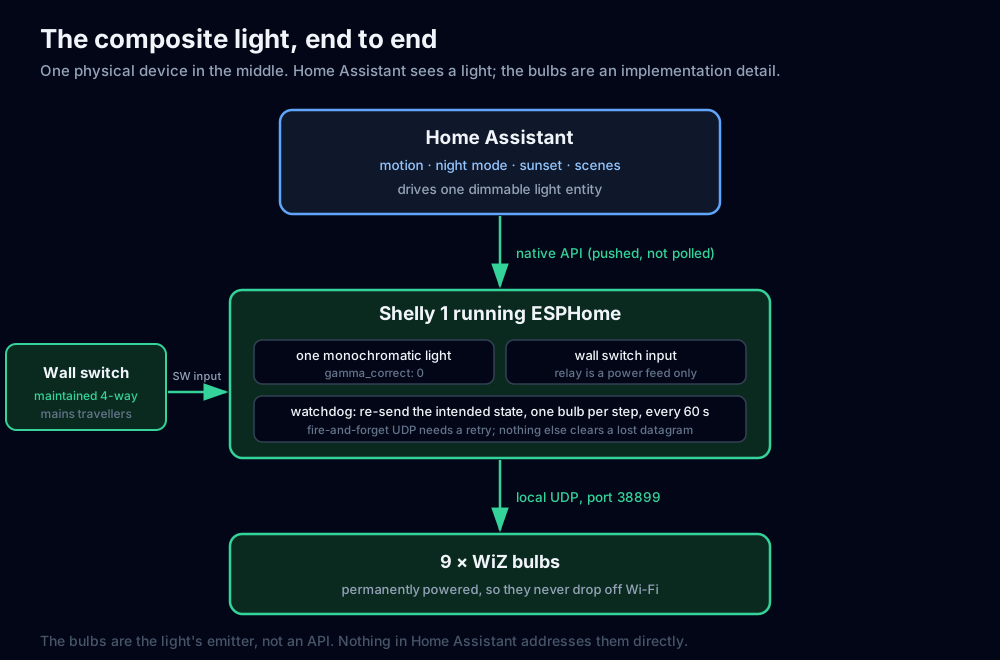
That is the whole design. The rest of this post is the details.
Why I prefer it to pointing Home Assistant at the bulbs
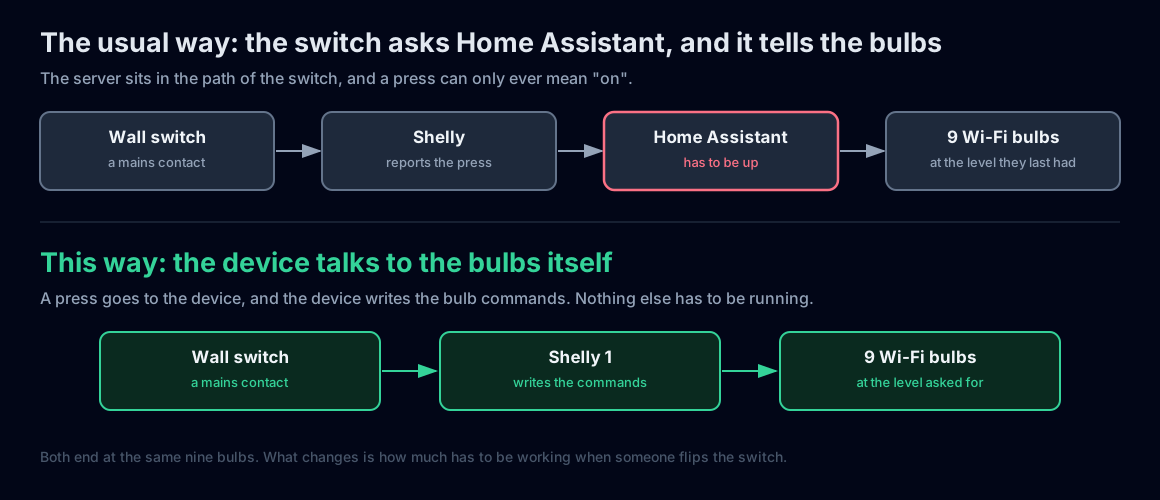
The common way is to let Home Assistant sit in the middle. The switch reports to Home Assistant, and Home Assistant turns the bulbs on. That works, and plenty of setups run that way. It just puts a server in the path of a wall switch.
A wall switch is the most reliable control in a house. It is a mechanical contact with mains on it and no software in it. If the switch has to ask a server before the light comes on, then the light comes on only while that server is up. Mine has gone down for a few minutes at a time, usually because I was working on it, and during those minutes the wall switch had nothing useful to do.
There is a second reason, and this is the one that surprised me. When Home Assistant relays a switch press to a group of bulbs, all it sends is “on”. There is no brightness in that flow, so the bulbs come on at whatever level they last had. That is why so many setups end up with a second automation fighting with the brightness afterwards. A device that writes the bulb commands itself can just say “on at 100%” and be done with it.
The same choice also tidies up Home Assistant. It gets one light to automate instead of nine bulbs, a group, and a script to keep them in step.
What you need
- A Shelly 1, flashed with ESPHome, wired so its switch input reads the wall switch
- Wi-Fi bulbs that accept commands locally. I use WiZ, which listen on UDP port 38899
- Home Assistant, if you want motion, schedules and scenes
- A fixed address for every bulb
Warning. The Shelly sits on mains wiring, and so does the switch feeding its input. Turn the circuit off at the panel first, check it with a tester, and if you are not confident working inside a switch box, get an electrician. The wiring half is in the earlier post.
Step 1: give every bulb a fixed address
The device holds a list of the bulb addresses and sends to each one directly. It does not use broadcast, because broadcast can be blocked or routed in ways that are hard to predict, and a list of addresses is easier to reason about. The trade is that a bulb which changes address is a bulb the device can no longer find, and it will fail quietly.
Reserve each bulb’s address in your router before the firmware goes on. After that the firmware’s list and the router’s reservations have to agree, and they will keep agreeing.
Step 2: check the bulbs answer local commands
Do this before you build anything, from a computer on the same network. WiZ bulbs answer a small JSON API over UDP on port 38899, so one shell line is enough to ask a bulb what it is. Netcat is the shortest way:
printf '{"method":"getPilot","params":{}}' | nc -u -w 2 "<IP Address 1>" 38899You should get the bulb’s reply on the same line. The -w 2 tells netcat to wait two seconds for an answer before giving up, which is what makes this work at all over UDP.
{"method":"getPilot","env":"pro","result":{"mac":"...","rssi":-60,
 "state":false,"sceneId":11,"temp":2700,"dimming":10}}
Asking all of them is less typing as a script, and it shows you which bulbs are quiet instead of making you run nine commands and compare. Save this as check_bulbs.py, edit the addresses, and run it:
import json, socket

bulbs = ["<IP Address 1>", "<IP Address 2>", "<IP Address 3>",
         "<IP Address 4>", "<IP Address 5>", "<IP Address 6>",
         "<IP Address 7>", "<IP Address 8>", "<IP Address 9>"]

for ip in bulbs:
    s = socket.socket(socket.AF_INET, socket.SOCK_DGRAM)
    s.settimeout(2)
    s.sendto(b'{"method":"getPilot","params":{}}', (ip, 38899))
    try:
        data, _ = s.recvfrom(2048)
        r = json.loads(data)["result"]
        print(f"{ip}  state={r['state']}  dimming={r['dimming']}  temp={r['temp']}K")
    except socket.timeout:
        print(f"{ip}  no reply")
    finally:
        s.close()
Mine prints nine identical lines, which is exactly what you want to see:
<IP Address 1>  state=False  dimming=10  temp=2700K
<IP Address 2>  state=False  dimming=10  temp=2700K
<IP Address 3>  state=False  dimming=10  temp=2700K
<IP Address 4>  state=False  dimming=10  temp=2700K
<IP Address 5>  state=False  dimming=10  temp=2700K
<IP Address 6>  state=False  dimming=10  temp=2700K
<IP Address 7>  state=False  dimming=10  temp=2700K
<IP Address 8>  state=False  dimming=10  temp=2700K
<IP Address 9>  state=False  dimming=10  temp=2700K
Then check that you can write to them as well as read. This one turns one bulb on at 35% and warm white:
import socket

s = socket.socket(socket.AF_INET, socket.SOCK_DGRAM)
s.settimeout(2)
s.sendto(b'{"method":"setPilot","params":{"state":true,"dimming":35,"temp":2700}}',
         ("<IP Address 1>", 38899))
print(s.recvfrom(2048)[0].decode())
The reply is {"method":"setPilot","env":"pro","result":{"success":true}}, and the bulb changes. If you run that, that bulb is now on at 35%, so turn it back off with {"state":false} in the same payload.
Two details in those replies matter later. The bulbs keep their own brightness and temperature, so they come back the way you left them. And a read gives you the true state, which is how you find the one bulb that has drifted out of step.
One thing to know before you build automations on the bulb entities. Home Assistant’s own WiZ integration polls, so it takes fifteen to thirty seconds to notice a change made outside it. That stops mattering in this design, because Home Assistant automates the light in the device rather than the bulbs, and that connection is pushed rather than polled.
Step 3: the device config
Here is the whole device config. It is one self-contained file, with the WiZ UDP helper written into it, so there is nothing else to include and nothing to download.
Two things to change before you flash it. Everywhere the config shows an address in angle brackets, put one of yours in: the device’s own static address first, then a line for every bulb. Miss one and esphome config will stop you with <IP Address> is not a valid IPv4 address, which is the placeholder doing its job rather than a fault in the config. And if you do not have nine bulbs, the bulb list length, the count: 9 in the watchdog script, and the >= 9 next to it all have to agree.
# =============================================================================
#  Hallway composite light  (single self-contained file)
# =============================================================================
#  One Shelly 1 running ESPHome, presenting ONE dimmable light to Home
#  Assistant, backed by a set of WiZ bulbs driven over the WiZ local UDP API.
#
#  Design intent:
#    * the wall switch works locally     -> no Home Assistant in the path
#    * Home Assistant drives the LIGHT   -> never the bulbs directly
#    * the relay is a power feed only    -> the bulbs never lose Wi-Fi
#
#  Every <IP Address ...> below is a placeholder. Replace them with your own
#  reserved addresses before flashing.
#
#  TWO THINGS TO CHANGE IF YOU DO NOT HAVE NINE BULBS: the count: 9 in the
#  watchdog script, and the >= 9 alongside it. The bulb list length, that
#  count, and that comparison all have to agree.
#
#  Drop this one file into the ESPHome add-on for your device, then
#  Install -> OTA. There are no external includes.
# =============================================================================

substitutions:
  devicename: swt-shelly1-hallway
  friendlyname: "Light: Hallway"
  fallback_ssid: "Hallway Light Fallback"
  ipaddr: "<IP Address>"          # this device's own reserved address

  # --- the composite light's emitter -----------------------------------------
  # The bulbs that make up this one logical light, by their reserved addresses.
  # Reserve each one in your router: the firmware sends to this list directly and
  # does not use broadcast, so a bulb that changes address is silently lost.
  wiz_bulbs: >-
    <IP Address 1>, <IP Address 2>, <IP Address 3>,
    <IP Address 4>, <IP Address 5>, <IP Address 6>,
    <IP Address 7>, <IP Address 8>, <IP Address 9>
  wiz_port: "38899"

esphome:
  name: ${devicename}
  friendly_name: ${friendlyname}
  comment: "Hallway composite light (Shelly 1 + WiZ bulbs over local UDP)"

esp8266:
  board: esp01_1m
  restore_from_flash: true

wifi:
  ssid: !secret wifi_ssid
  password: !secret wifi_password
  manual_ip:
    static_ip: ${ipaddr}
    gateway: !secret gateway
    subnet: !secret subnet
  ap:
    ssid: ${fallback_ssid}
    password: !secret ota_password

captive_portal:

logger:
  level: INFO

api:
  encryption:
    key: !secret api_encryption_key

ota:
  platform: esphome
  password: !secret ota_password

web_server:
  port: 80

time:
  - platform: homeassistant
    id: homeassistant_time

# Shelly 1 status LED on GPIO0
status_led:
  pin:
    number: GPIO0
    inverted: yes

# -----------------------------------------------------------------------------
#  THE COMPOSITE LIGHT
# -----------------------------------------------------------------------------
#  A monochromatic light whose "output" is not a GPIO but the WiZ bulbs.
#  Home Assistant sees one dimmable light. The bulbs are an implementation
#  detail and should be hidden from its UI.
#
#  level 0.0      -> setPilot state:false
#  level 0.01-1.0 -> setPilot state:true, dimming = level * 100
# -----------------------------------------------------------------------------
output:
  - platform: template
    id: wiz_output
    type: float
    write_action:
      lambda: |-
        // --- WiZ local UDP helper, inlined (port 38899) --------------------
        // Send one setPilot datagram to each address in the CSV list.
        // Sending per-bulb is deliberate: no dependence on broadcast support.
        {
          WiFiUDP udp;
          const char* csv = "${wiz_bulbs}";
          char buf[160];
          strncpy(buf, csv, sizeof(buf)-1); buf[sizeof(buf)-1] = 0;
          char payload[96];
          if (state <= 0.0f) {
            strcpy(payload, "{\"method\":\"setPilot\",\"params\":{\"state\":false}}");
          } else {
            int dim = (int)lroundf(state * 100.0f);
            if (dim < 1)   dim = 1;
            if (dim > 100) dim = 100;
            snprintf(payload, sizeof(payload),
                     "{\"method\":\"setPilot\",\"params\":{\"state\":true,\"dimming\":%d}}", dim);
          }
          char* tok = strtok(buf, ",");
          while (tok) {
            // trim whitespace
            char* e = tok + strlen(tok) - 1;
            while (e >= tok && isspace((unsigned char)*e)) *e-- = 0;
            while (*tok && isspace((unsigned char)*tok)) tok++;
            if (*tok) {
              udp.beginPacket(tok, ${wiz_port});
              udp.write((const uint8_t*)payload, strlen(payload));
              udp.endPacket();
            }
            tok = strtok(nullptr, ",");
          }
        }

light:
  - platform: monochromatic
    name: "Hallway"
    id: hallway
    output: wiz_output
    # 0, not the ESPHome default of 2.8: the emitter is a WiZ dimming
    # percentage, not a PWM duty cycle, and the bulbs apply their own
    # perceptual curve. At 2.8 a requested 30% reached the bulbs as 3%.
    gamma_correct: 0
    # A power blip must NOT light the hallway. Lights come on from an explicit
    # act (a wall press, motion, or an automation), never from a reboot.
    restore_mode: RESTORE_DEFAULT_OFF
    default_transition_length: 0s

# -----------------------------------------------------------------------------
#  PHYSICAL SWITCH  (the maintained switch on mains travellers, into the SW input)
# -----------------------------------------------------------------------------
#  on_state reacts to a LEVEL CHANGE, so this works identically from either
#  position of a maintained multi-way switch. A press turns the light ON AT
#  100% (not a restored level) or OFF.
# -----------------------------------------------------------------------------
binary_sensor:
  - platform: gpio
    name: "Input"
    pin:
      number: GPIO5
      mode: input
    id: input
    on_state:
      - logger.log: "Wall switch changed"
      - if:
          condition:
            light.is_off: hallway
          then:
            - light.turn_on:
                id: hallway
                brightness: 100%
          else:
            - light.turn_off: hallway
    internal: True

# -----------------------------------------------------------------------------
#  RELAY  (power feed only, never switched by an automation)
# -----------------------------------------------------------------------------
#  RESTORE_DEFAULT_ON so the bulbs are always powered and therefore always
#  addressable. Cutting this would drop your Wi-Fi bulbs off the network.
#  Kept exposed as a diagnostic for manual recovery only.
# -----------------------------------------------------------------------------
switch:
  - platform: gpio
    name: "Relay"
    pin: GPIO4
    id: relay
    restore_mode: RESTORE_DEFAULT_ON
    entity_category: diagnostic

# -----------------------------------------------------------------------------
#  WATCHDOG  (paced periodic re-assert)
# -----------------------------------------------------------------------------
#  Every 60s the light's intended state is re-sent to every bulb, one bulb per
#  script step with a short pause between. A datagram lost from the
#  fire-and-forget burst in the write path gets retried within a minute, and a
#  bulb that dropped off Wi-Fi and came back with stale state is pulled back in
#  line.
#
#  It re-asserts id(hallway), the same thing the wall switch and Home
#  Assistant both drive, so it cannot fight either of them.
#
#  Deliberately NOT a read-back check: getPilot replies never reach the
#  ESP8266's UDP socket. WiFiUDP::beginPacket() only connects a socket for
#  sending, and without begin()/listen there is no receive path, so
#  parsePacket() always returns 0. Per-bulb state checking belongs in Home
#  Assistant, which already reaches each bulb through the WiZ integration.
# -----------------------------------------------------------------------------
globals:
  - id: wiz_idx
    type: int
    restore_value: no
    initial_value: "0"

script:
  # Re-send the intended state to the id(wiz_idx)-th bulb. The caller paces it.
  - id: wiz_reassert_one
    mode: single
    then:
      - lambda: |-
          const char* csv = "${wiz_bulbs}";
          char buf[192];
          strncpy(buf, csv, sizeof(buf) - 1);
          buf[sizeof(buf) - 1] = 0;

          // resolve the idx-th address, with the same trimming as the send path
          char ip[20] = "";
          int i = 0;
          char* tok = strtok(buf, ",");
          while (tok != nullptr) {
            char* e = tok + strlen(tok) - 1;
            while (e >= tok && isspace((unsigned char) *e)) *e-- = 0;
            while (*tok && isspace((unsigned char) *tok)) tok++;
            if (*tok) {
              if (i == id(wiz_idx)) {
                strncpy(ip, tok, sizeof(ip) - 1);
                ip[sizeof(ip) - 1] = 0;
                break;
              }
              i++;
            }
            tok = strtok(nullptr, ",");
          }

          // advance the cursor first, so nothing can stall the walk
          id(wiz_idx) = id(wiz_idx) + 1;
          if (id(wiz_idx) >= 9) id(wiz_idx) = 0;
          if (ip[0] == 0) return;

          // build the same payload the write path builds
          char payload[96];
          if (!id(hallway).current_values.is_on()) {
            strcpy(payload, "{\"method\":\"setPilot\",\"params\":{\"state\":false}}");
          } else {
            int dim = (int) lroundf(id(hallway).current_values.get_brightness() * 100.0f);
            if (dim < 1) dim = 1;
            if (dim > 100) dim = 100;
            snprintf(payload, sizeof(payload),
                     "{\"method\":\"setPilot\",\"params\":{\"state\":true,\"dimming\":%d}}", dim);
          }

          WiFiUDP udp;
          udp.beginPacket(ip, ${wiz_port});
          udp.write((const uint8_t*) payload, strlen(payload));
          udp.endPacket();
          ESP_LOGD("wiz_watchdog", "%s <- %s", ip, payload);

  # Walk every bulb, one per step. Change 9 here and in the comparison below
  # if your bulb list is not nine long.
  - id: wiz_reassert_all
    mode: single
    then:
      - repeat:
          count: 9
          then:
            - script.execute: wiz_reassert_one
            - delay: 60ms
      - lambda: |-
          ESP_LOGD("wiz_watchdog", "re-asserted the light state on every bulb");

interval:
  - interval: 60s
    then:
      - if:
          condition:
            wifi.connected:
          then:
            - script.execute: wiz_reassert_all

# -----------------------------------------------------------------------------
#  DIAGNOSTICS
# -----------------------------------------------------------------------------
sensor:
  - platform: wifi_signal
    name: "${friendlyname} WiFi Signal"
    update_interval: 60s
  - platform: uptime
    name: "${friendlyname} Uptime"
    update_interval: 60s

text_sensor:
  - platform: version
    name: "${friendlyname} ESPHome Version"
  - platform: wifi_info
    ip_address:
      name: "${friendlyname} IP Address"
    ssid:
      name: "${friendlyname} Connected SSID"
    bssid:
      name: "${friendlyname} Connected BSSID"

button:
  - platform: restart
    name: "${friendlyname} Restart"
    entity_category: diagnostic
  # On-demand run of the watchdog: useful after a bulb is power-cycled, or to
  # push the light's state to every bulb immediately instead of waiting for the
  # next 60s pass.
  - platform: template
    name: "${friendlyname} Re-assert Now"
    entity_category: diagnostic
    on_press:
      - script.execute: wiz_reassert_all

preferences:
  flash_write_interval: 1min
The config pulls six values out of ESPHome’s secrets.yaml, which sits next to it:
wifi_ssid: "YOUR_WIFI_SSID"
wifi_password: "YOUR_WIFI_PASSWORD"
gateway: "<Gateway IP Address>"
subnet: "255.255.255.0"
ota_password: "SOMETHING_YOU_CHOOSE"
api_encryption_key: "GENERATE_THIS"
Generate the last one with openssl rand -base64 32. It has to be a base64 key of exactly 32 bytes, because it is the same key you paste into Home Assistant when it asks for the encryption key on first connect.
To get it onto the device, put both files in the ESPHome add-on’s config directory and use Install, then OTA. If you would rather check it first, esphome config hallway-light.yaml validates the file without touching the device, and esphome run hallway-light.yaml compiles and uploads it over the network. The Shelly 1 is an ESP8266 with 1 MB of flash, and this config lands around 43% of RAM and 51% of flash, so there is room to spare.
Three lines in there are doing more work than they look like, and two of them are argued further down. gamma_correct: 0 is the brightness curve, restore_mode: RESTORE_DEFAULT_OFF is what stops a power blip from lighting the hallway, and restore_mode: RESTORE_DEFAULT_ON on the relay is what keeps the bulbs reachable.
Step 4: read the switch, and say the brightness
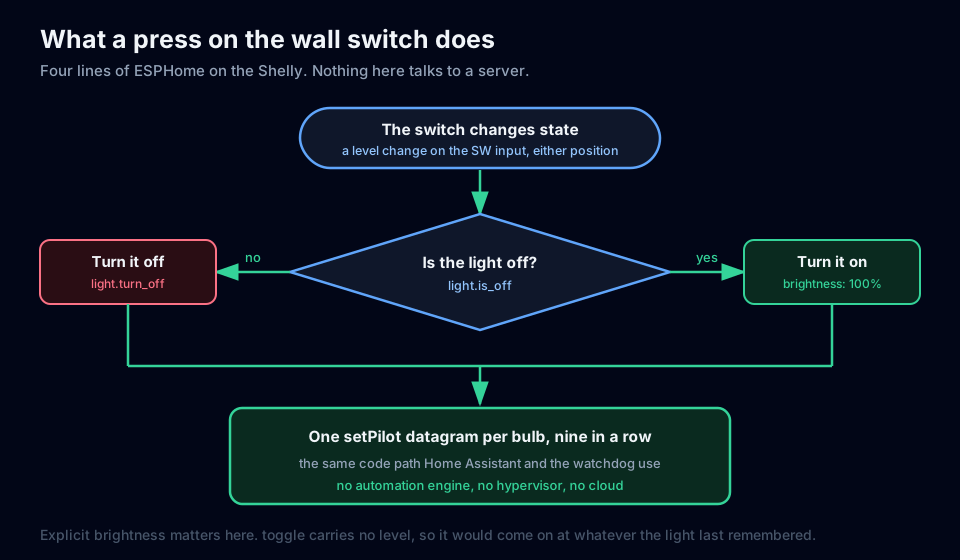
The switch is an input, not a power control. Its only job is to tell the device that someone pressed it. This is the binary_sensor block from the config above:
binary_sensor:
  - platform: gpio
    name: "Input"
    pin:
      number: GPIO5
      mode: input
    id: input
    on_state:
      - logger.log: "Wall switch changed"
      - if:
          condition:
            light.is_off: hallway
          then:
            - light.turn_on:
                id: hallway
                brightness: 100%
          else:
            - light.turn_off: hallway
    internal: True
Two choices in there do the real work.
on_state reacts to the switch changing position, not to a pattern of quick clicks. That matters on a multi-way circuit. A momentary button gives you a clean on-off-on every time you double press it, which you can match on timing. A maintained switch gives you on-off-on or off-on-off depending on which position it was already sitting in, so any gesture you build on top of it works half the time and feels broken. Reacting to a level change works the same from either position, and nobody has to learn anything.
brightness: 100% is stated rather than implied. A press is a deliberate act, so it turns the light fully on. The alternative is the light.toggle action, which carries no brightness at all and leaves you with whatever level the light last had. On a light where a low level means the night light comes on dim, that quietly hands you a dim hallway instead of a lit one, and you only find out the evening after a night-light night.
Step 5: leave the relay switched on
The relay holds the bulbs’ power on, permanently, and nothing in the automations touches it.
That is what keeps the bulbs reachable. Switch the relay and you cut power to nine Wi-Fi bulbs, which is exactly the problem the original wiring was designed to avoid.
It is still exposed in Home Assistant as a diagnostic entity. That is deliberate: it is the only lever that can power-cycle nine bulbs at once, and I have used it when a bulb wandered off the network.
Step 6: point Home Assistant at the one light
The device is the actuator now, so Home Assistant has to stop addressing the bulbs.
Hide the nine bulb entities and their group. If both the light and the group can drive the same hardware, you have two writers for one lamp, which is where the confusing behaviour comes from in the first place. Then point motion, the evening turn-on, Night Mode and the storm automation at the single light entity.
Expect one wrinkle on the first flash. The ESPHome integration namespaces a new light under the device’s existing name, so it tends to arrive with a long unreadable name. Rename it in the entity registry, then repoint your automations at the new name.
Two things to get right
The first is the brightness curve. ESPHome’s light components apply gamma_correct: 2.8 by default, which is correct when the component is driving a lamp directly and you are compensating for how eyes see dimming. Here the output is a number handed to bulbs that apply their own curve, so you get two curves instead of one and the low end collapses. I measured what reached the bulbs before I understood this.
| Home Assistant asked for | reached the bulbs |
|---|---|
| 30% | 3% |
| 50% | 15% |
| 80% | 54% |
| 100% | 100% |
Set gamma_correct: 0 and a percentage means a percentage. The side effect is that the same automation values now render brighter than they used to, so if your night level reads too bright, tune the percentage in the automation rather than putting the curve back.
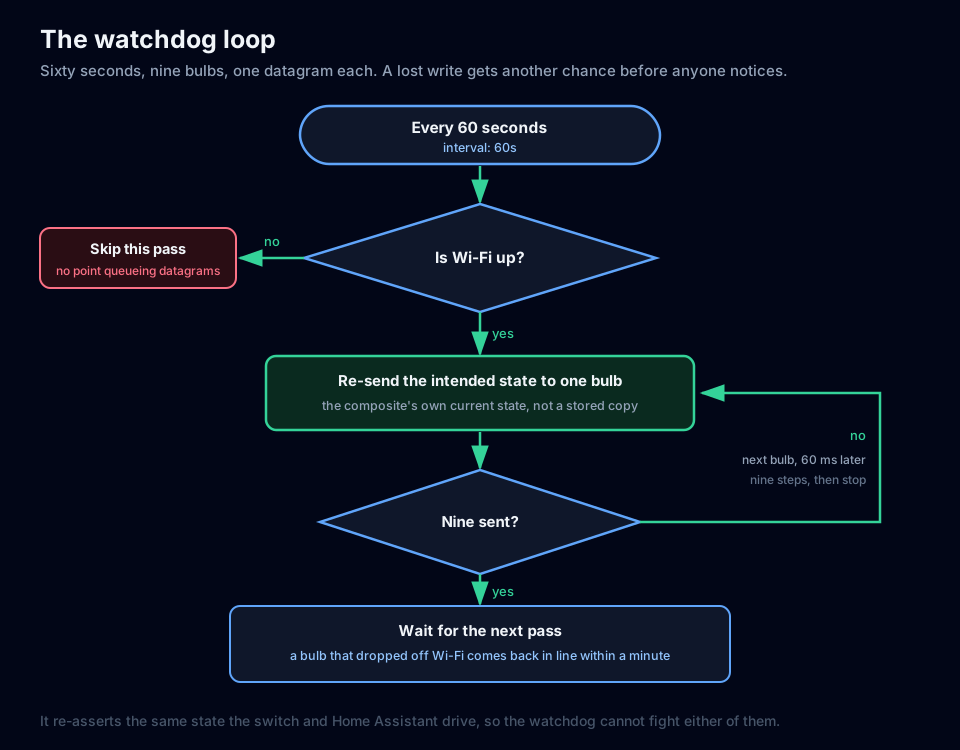
The second is that a command can go missing. The light sends one datagram per bulb, back to back, and it does not wait for an answer. Lose one and that bulb stays wherever it was. Nothing clears it either, because the bulbs are never power-cycled, so a single dropped packet can leave one bulb lit for hours while every controller reports the hallway as off. I have come downstairs to exactly that.
The fix is the watchdog in the config: every minute it re-sends the light’s current state to all nine bulbs, one bulb per step with a short pause between them. It does not read the bulbs back, it just repeats the command. That is enough. A lost datagram is retried within a minute, and a bulb that went away and came back gets pulled into line.
I did try the read-back version first, and it is worth knowing why it fails. It ran every minute and reported success while correcting nothing, because on an ESP8266 the socket you open to send is not listening for replies, so every read came back empty. If you write that version, log how many replies you got rather than whether the pass finished.
What this costs you
Motion still needs Home Assistant, and that is the honest limit of the design. The motion sensor is Zigbee and the bulbs are Wi-Fi, and Home Assistant is the only thing here that speaks both. So the wall switch works with the server down, and the motion night-light does not. That is the part I wanted: a switch that behaves like a switch, with the clever stuff available when the server is around.
The light is brightness only. Colour and white temperature would mean more fields in the command and a light component that carries them, and this hallway does not need either.
Every bulb needs a fixed address, and the firmware carries the list. Adding a tenth bulb means editing that list, and the two nine-counts that go with it, then reflashing. It is a small change, but it is not a zero-line one.
How I checked it
The config above is the config that is running, with the addresses swapped for placeholders and nothing else changed. I filled the placeholders in and put it through the same toolchain the device runs, ESPHome 2026.8.2: esphome config reports the configuration is valid, and a full esphome compile succeeds at 43.1% of RAM and 50.7% of flash. Substitute your own addresses and you are building what is running in my hallway.
I also re-checked the running device. It reports ESPHome 2026.8.2 at config hash 0xa71652ed, built on 2026-09-15, which is the build carrying both of the fixes above. All nine bulbs answered a direct read and all nine agreed on state, dimming and temperature. The light entity is dimmable and currently off, no automation references the old arrangement, and the nine bulb entities plus their group are hidden.
One light in the middle, nine datagrams every time it changes, and a wall switch that does not care whether the server is up.
Loading comments…